
Inception ICORE Server
About
Model–Context–Protocol (MCP) Server A modular, extensible Rust-based server providing short-term, long-term, and latent memory services, a chat endpoint backed by a BaseAgent + Sentience DSL, and seamless integration with ChromaDB and LLM services.
Details
- License
- View license
Explore
- Modular Memory Layers
- Short-Term: Fast, in-memory key-value store (volatile).
- Long-Term: Persistent SQLite-backed key-value store.
- Latent Memory: Vector embeddings and nearest-neighbor queries via ChromaDB.
- Agent Logic
- BaseAgent: Simple “remember”, “recall”, and “if context includes” logic.
- Sentience DSL: Loadable DSL for scripting custom response logic, with seamless seeding/flushing of memory layers.
- LLM Fallback
- Out-of-the-box integration with any HTTP-based LLM (e.g., a local Llama server) for fallback generation.
- HTTP API
- Exposes endpoints for managing memory, embedding/querying vectors, chatting, and running DSL code directly.
- JSON-based request/response formats.
- Docker Compose Setup
- Preconfigured docker-compose.dev.yml to orchestrate ChromaDB, a local LLM service, and the ICORE Server.
- Asynchronous
- Built on Rust’s Tokio runtime for high concurrency and performance.
- Extensible & Configurable
- Easily swap out ChromaDB URL, LLM URL, database paths, and DSL scripts via environment variables.
---

Setting up with Highlight
This MCP is not yet compatible with Highlight’s one-click setup. However, you can still use it with Highlight by following these steps:
- Download and install Highlight from highlightai.com/download
- Navigate to the plugins tab and select "Add Custom Plugin"
-
Configure the plugin with the settings below
Plugin Name
Inception ICORE ServerCommand (node, npx, python, etc.)Please refer to the README for specific instructions on how to obtain API keys or other required environment variables.
- Enable "Start Automatically" if you want the plugin to start when Highlight launches





From the repository
1. Rust toolchain
- Install rustup and ensure you have a recent stable toolchain:
rustup update stable
rustup default stable
2. Docker & Docker Compose (for full development setup)
- Docker Desktop or Docker Engine v20+
- Docker Compose v1.29+ (or v2 integrated in Docker CLI)
3. Ports
- ChromaDB: 8000
- LLM Server: 11434
- ICORE Server: 8080
---
Create a .env file in project root or export the following in your shell:
A ready-made docker-compose.dev.yml orchestrates:
- chromadb service
- llm (local Llama server)
- ICORE-server (this Rust application)
1. Ensure you have a valid CHROMA_COLLECTION_ID. If not, you must create a collection in ChromaDB first (via its HTTP API or UI).
2. In the project root (where docker-compose.dev.yml lives), run:
docker-compose -f docker-compose.dev.yml up -d --build
This will:
- Pull/build the chromadb/chroma:0.6.3 image and expose port 8000.
- Build the local LLM container (Dockerfile.server in llama.cpp/) and expose port 11434.
- Build the ICORE Server container (Dockerfile in project root) and expose port 8080.
3. Verify all services are healthy:
docker-compose -f docker-compose.dev.yml ps
4. Test the ICORE server:
curl -i http://localhost:8080/api/ping
If you prefer to run everything natively:
1. Start ChromaDB
- Download & run ChromaDB:
docker run -d --name chroma-local \
-p 8000:8000 \
-e IS_PERSISTENT=FALSE \
-e ANONYMIZED_TELEMETRY=FALSE \
chromadb/chroma:0.6.3
- Create a collection (use Postman/cURL or ChromaDB UI) and note its UUID.
2. Start LLM Server (e.g., llama.cpp)
- Navigate to ./llama.cpp/ (ensure Dockerfile.server is configured).
- Build & run:
docker build -t llama-server -f Dockerfile.server .
docker run -d --name llama-server -p 11434:11434 llama-server \
--model /models/mistral-7b-q4.gguf \
--port 11434 --ctx-size 256 --threads 1
3. Configure .env (in project root):
CHROMADB_URL=http://localhost:8000
CHROMA_COLLECTION_ID=<your-collection-uuid>
LLM_URL=http://localhost:11434
ICORE_ENV=development
RUST_LOG=info
4. Run ICORE Server
cargo run
The server will:
- Initialize ShortTermMemory (in-memory).
- Initialize LongTermMemory (SQLite file memory.db).
- Initialize LatentMemory (ChromaDB client to given URL).
- Attempt to load agent.sent from project root (if present).
- Start listening on 0.0.0.0:8080.
---
| Variable | Description | Default / Example |
| ---------------------- | ----------------------------------------------------------------------------------------------- | -------------------------------------- |
| CHROMADB_URL | URL of ChromaDB HTTP API (e.g., http://localhost:8000). | http://localhost:8000 |
| CHROMA_COLLECTION_ID | UUID of the ChromaDB collection for storing/querying embeddings. Must exist beforehand. | 1414cedf-3081-4235-ab29-656549bdff1a |
| LLM_URL | Base URL for the LLM service (used for fallback text generation). | http://localhost:11434 |
| ICORE_ENV | Environment mode (development or production). Controls logging/filtering and optimizations. | development |
| RUST_LOG | Logging filter for tracing_subscriber. (e.g. info). | info |
| DATABASE_URL | (Optional) SQLite file path for long-term memory (used by sqlx). Defaults to memory.db. | memory.db |
| AGENT_SENT_FILE | (Optional) Path to a Sentience DSL script (defaults to agent.sent in project root). | ./agent.sent |
> Note:
>
> - If environment variables are missing, the server will panic on startup.
> - Always ensure CHROMA_COLLECTION_ID matches an existing ChromaDB collection ID.
---
Claude Desktop / Cursor
Paste into your MCP client config file to install this server.
{
    "mcpServers": {
        "inception icore server": {
            "inception-core-server": {
                "command": "docker",
                "args": [
                    "run",
                    "-d",
                    "--name",
                    "chroma-local",
                    "\\"
                ]
            }
        }
    }
}McpServers
{
"inception-core-server": {
"command": "docker",
"args": [
"run",
"-d",
"--name",
"chroma-local",
"\\"
]
}
}




> Inception core (ICORE) Server
> A modular, extensible Rust-based server providing short-term, long-term, and latent memory services, a chat endpoint backed by a BaseAgent + Sentience DSL, and seamless integration with ChromaDB and LLM services.
> ⚠️ Work In Progress: This project is under active development. Interfaces, APIs, and internal structure may change frequently.
---
Table of Contents
1. Overview
2. Features
3. Architecture & Components
1. BaseAgent & Sentience DSL
2. Memory Layers
- Short-Term Memory
- Long-Term Memory
- Latent Memory (ChromaDB)
3. LLM Integration
4. HTTP API (Axum)
4. Getting Started
1. Prerequisites
2. Clone & Build
3. Environment Variables
4. Running with Docker Compose
5. Running Locally without Docker
6. Testing the Server
5. Configuration & Environment Variables
6. API Reference
1. Health Check
2. Short-Term Memory Endpoints
3. Long-Term Memory Endpoints
4. Latent Memory (ChromaDB) Endpoints
5. Chat Endpoint
6. Sentience DSL Endpoint
7. Agent DSL (“Sentience”) Details
8. Directory Structure
9. Logging & Monitoring
10. Development Workflow
11. Contributing
12. License
---
Overview
Inception ICORE Server is designed as a highly flexible microservice that facilitates:
- Short-Term Memory for transient key-value storage (in-memory).
- Long-Term Memory for persistent key-value storage (SQLite).
- Latent Memory (vector embeddings + similarity search) backed by ChromaDB.
- A BaseAgent capable of “remember/recall/if context” operations, with an optional Sentience DSL layer that can be loaded at runtime.
- A Chat endpoint that routes incoming messages first to the Sentience DSL (if loaded), then falls back to a standard BaseAgent, and finally to a fallback LLM.
- A simple, well-documented HTTP API (built on Axum) for interacting with all layers of memory and agent functionality.
This README will guide you through architecture details, setup instructions, environment configuration, API usage, and development workflows.
> See VISION.md for the philosophical motivation and long-term intent behind this project.
---
Features
- Modular Memory Layers
- Short-Term: Fast, in-memory key-value store (volatile).
- Long-Term: Persistent SQLite-backed key-value store.
- Latent Memory: Vector embeddings and nearest-neighbor queries via ChromaDB.
- Agent Logic
- BaseAgent: Simple “remember”, “recall”, and “if context includes” logic.
- Sentience DSL: Loadable DSL for scripting custom response logic, with seamless seeding/flushing of memory layers.
- LLM Fallback
- Out-of-the-box integration with any HTTP-based LLM (e.g., a local Llama server) for fallback generation.
- HTTP API
- Exposes endpoints for managing memory, embedding/querying vectors, chatting, and running DSL code directly.
- JSON-based request/response formats.
- Docker Compose Setup
- Preconfigured docker-compose.dev.yml to orchestrate ChromaDB, a local LLM service, and the ICORE Server.
- Asynchronous
- Built on Rust’s Tokio runtime for high concurrency and performance.
- Extensible & Configurable
- Easily swap out ChromaDB URL, LLM URL, database paths, and DSL scripts via environment variables.
---
Architecture & Components
Architecture as Brain
The inception-ICORE-server acts as the brain stem of an artificial intelligence system — responsible for coordination, memory routing, and protocol-level reflexes.
Its structure is inspired by the biological brain:
- Inception (this server) — _Brain stem_
Manages memory access, agent execution, and DSL processing. It doesn't "think" — it regulates.
- Cortex (Memory layers) — _Cognitive cortex_
Stores long-term knowledge (SQLite), short-term working memory (in-memory), and latent semantic space (ChromaDB).
- Agents — _Organs_
Input/output entities that perceive, act, and reflect using structured memory and embedded logic.
- ICORE Protocol — _Neural signals_
A standardized communication flow between memory, agents, and logic evaluators.
This separation enables modular development, autonomous behavior, and semantic reflection — one layer at a time.
Below is a high-level architecture diagram and description of each core component and how they interact:
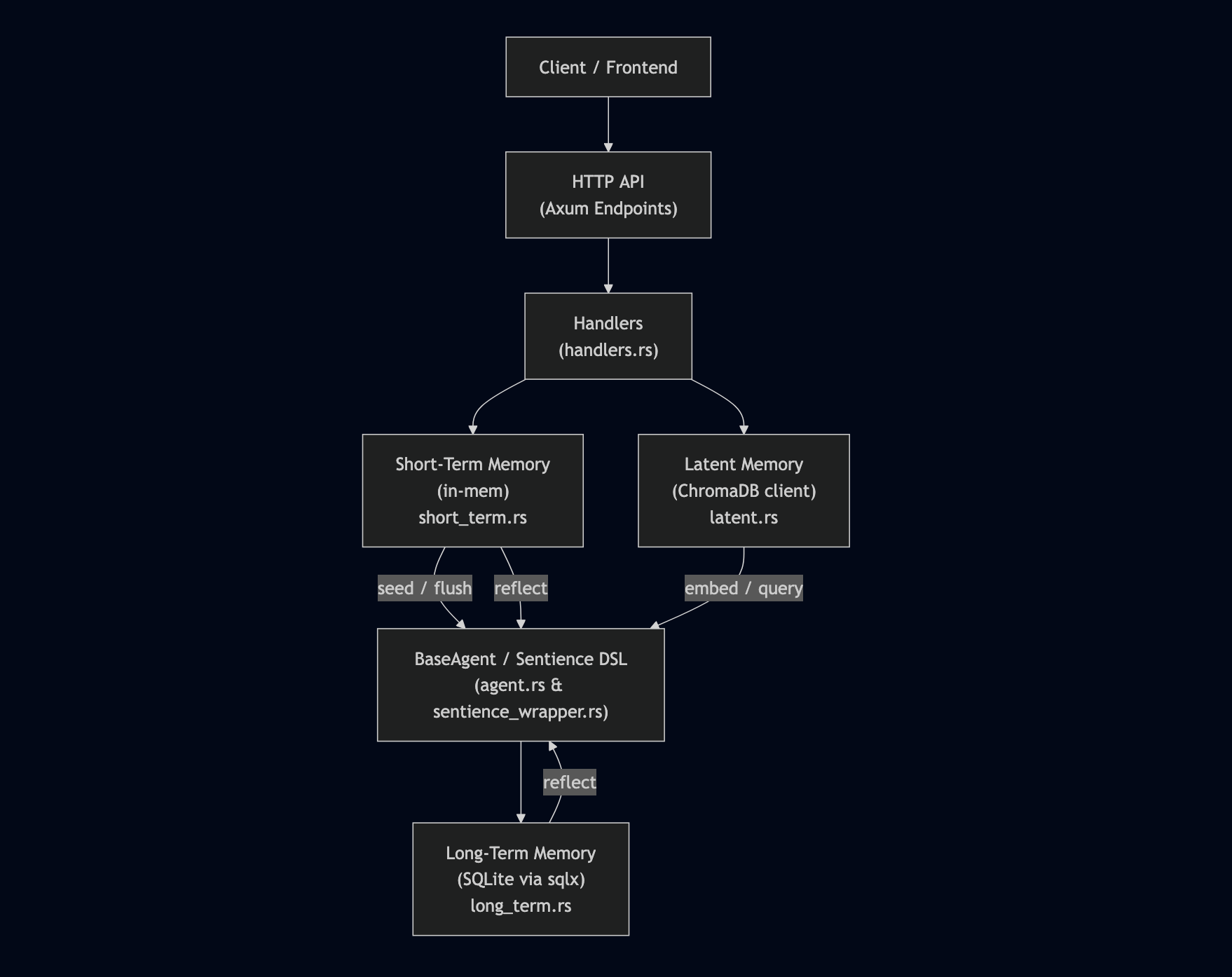
BaseAgent & Sentience DSL
- BaseAgent (agents/agent.rs):
- Maintains an in-process context (Context) for simple “remember/recall/if context includes” logic.
- Optionally holds a SentienceWrapper (via Mutex<SentienceWrapper>) when DSL code is loaded.
- SentienceWrapper (agents/sentience_wrapper.rs):
- Wraps a SentienceAgent (from the sentience crate).
- On each handle_code(code_str), it:
1. Seeds the DSL’s internal memories with global short/long memory.
2. Executes the DSL code synchronously.
3. Flushes any writes back to global short/long memory.
- Allows DSL scripts (e.g., agent.sent) to read/write both short-term and long-term global stores.
Memory Layers
1. Short-Term Memory (memory/short_term.rs):
- In-memory HashMap<String, String>.
- Fast read/write for transient key-value pairs.
- Volatile (lost on server restart).
2. Long-Term Memory (memory/long_term.rs):
- SQLite-backed key-value store (via sqlx).
- Persistent on disk (memory.db).
- Async get, set, and all operations.
3. Latent Memory (memory/latent.rs):
- Interfaces with ChromaDB REST API for vector embeddings and similarity search.
- Provides methods:
- embed(id: &str, vector: Vec<f32>) → stores a dummy or computed embedding under id.
- query(vector: Vec<f32>) → returns a list of (id, score) pairs.
- In this prototype, embeddings are dummy zero-vectors (vec![0.0; 1536]), but you can replace with real LLM encoder outputs.
LLM Integration
- The server expects an environment variable LLM_URL pointing to a local LLM HTTP server (e.g., llama.cpp server).
- Chat fallback logic (in handlers/chat) calls:
model::generate(&payload.message).await
which sends an HTTP request to LLM_URL with JSON { "prompt": "..."} and returns the generated text.
HTTP API (Axum)
- Uses Axum v0.7 with Tokio runtime.
- Routes defined in api/routes.rs and handlers in api/handlers.rs.
- All endpoints respond with JSON or (StatusCode, String) combos (converted via impl IntoResponse).
---
Getting Started
Prerequisites
1. Rust toolchain
- Install rustup and ensure you have a recent stable toolchain:
     rustup update stable
     rustup default stable
2. Docker & Docker Compose (for full development setup)
- Docker Desktop or Docker Engine v20+
- Docker Compose v1.29+ (or v2 integrated in Docker CLI)
3. Ports
- ChromaDB: 8000
- LLM Server: 11434
- ICORE Server: 8080
---
Clone & Build
git clone https://github.com/your-org/inception-ICORE-server.git
cd inception-ICORE-server
You can verify that the project builds locally:
cargo build
Clone Sentience Dependency
This project depends on a local Rust crate named sentience.
Clone it into the same parent directory as this project:
git clone https://github.com/nbursa/sentience.git
---
Environment Variables
Create a .env file in project root or export the following in your shell:
```bash
Sign in to leave a review
Use Google, GitHub, or an email account so ratings stay tied to real people.
No reviews posted yet.



