
Lark rs MCP
About
Lark rs MCP is a server that implements the Model Context Protocol (MCP) to integrate with Feishu (Lark) APIs. It enables AI models to interact with Feishu services, specifically reading metadata and content from multidimensional tables and batch-creating records. It is designed…
Details
- License
- MIT
Explore
- Reads metadata and content from Feishu multidimensional tables
- Supports batch creation of records in multidimensional tables
- Communicates via STDIO (standard input/output) only
- Written in Rust for performance and reliability

Setting up with Highlight
This MCP is not yet compatible with Highlight’s one-click setup. However, you can still use it with Highlight by following these steps:
- Download and install Highlight from highlightai.com/download
- Navigate to the plugins tab and select "Add Custom Plugin"
-
Configure the plugin with the settings below
Plugin Name
Lark rs MCPCommand (node, npx, python, etc.)Please refer to the README for specific instructions on how to obtain API keys or other required environment variables.
- Enable "Start Automatically" if you want the plugin to start when Highlight launches





From the repository
Clone the repository, then compile with cargo build. Point the MCP client's command to the compiled binary path. At runtime, set environment variables following the .env.example format for Feishu authentication. Currently only STDIO mode is supported, and the server has been tested with the Chatwise client.
Claude Desktop / Cursor
Paste into your MCP client config file to install this server.
{
    "mcpServers": {
        "lark rs mcp": {
            "larkrs-mcp": {
                "command": "/Users/code/mcp/larkrs-mcp/target/debug/larkrs-mcp",
                "env": {
                    "FEISHU_APP_ID": "<your-app-id>",
                    "FEISHU_APP_SECRET": "<your-app-secret>"
                }
            }
        }
    }
}McpServers
{
    "larkrs-mcp": {
        "command": "/Users/code/mcp/larkrs-mcp/target/debug/larkrs-mcp",
        "env": {
            "FEISHU_APP_ID": "<your-app-id>",
            "FEISHU_APP_SECRET": "<your-app-secret>"
        }
    }
}
飞书MCP服务器是一个基于MCP的服务,提供飞书API集成,使AI模型能够轻松与飞书服务交互。
功能特点
- 多维表格: 读取多维表格元数据和内容, 提供批量创建记录的功能
- 多模式支持: 目前仅支持STDIO模式
- STDIO:通过标准输入/输出通信,适用于CLI环境和集成到其他应用
配置
> 目前仅支持验证chatwise中的运行情况
首先将本项目克隆到本地:
cd /path/to/your/project
git clone https://github.com/your-repo/larkrs-mcp.git
然后使用 cargo build 编译项目:
cd larkrs-mcp
cargo build
将编译产物的路径直接复制到MCP client的命令中, 例如:
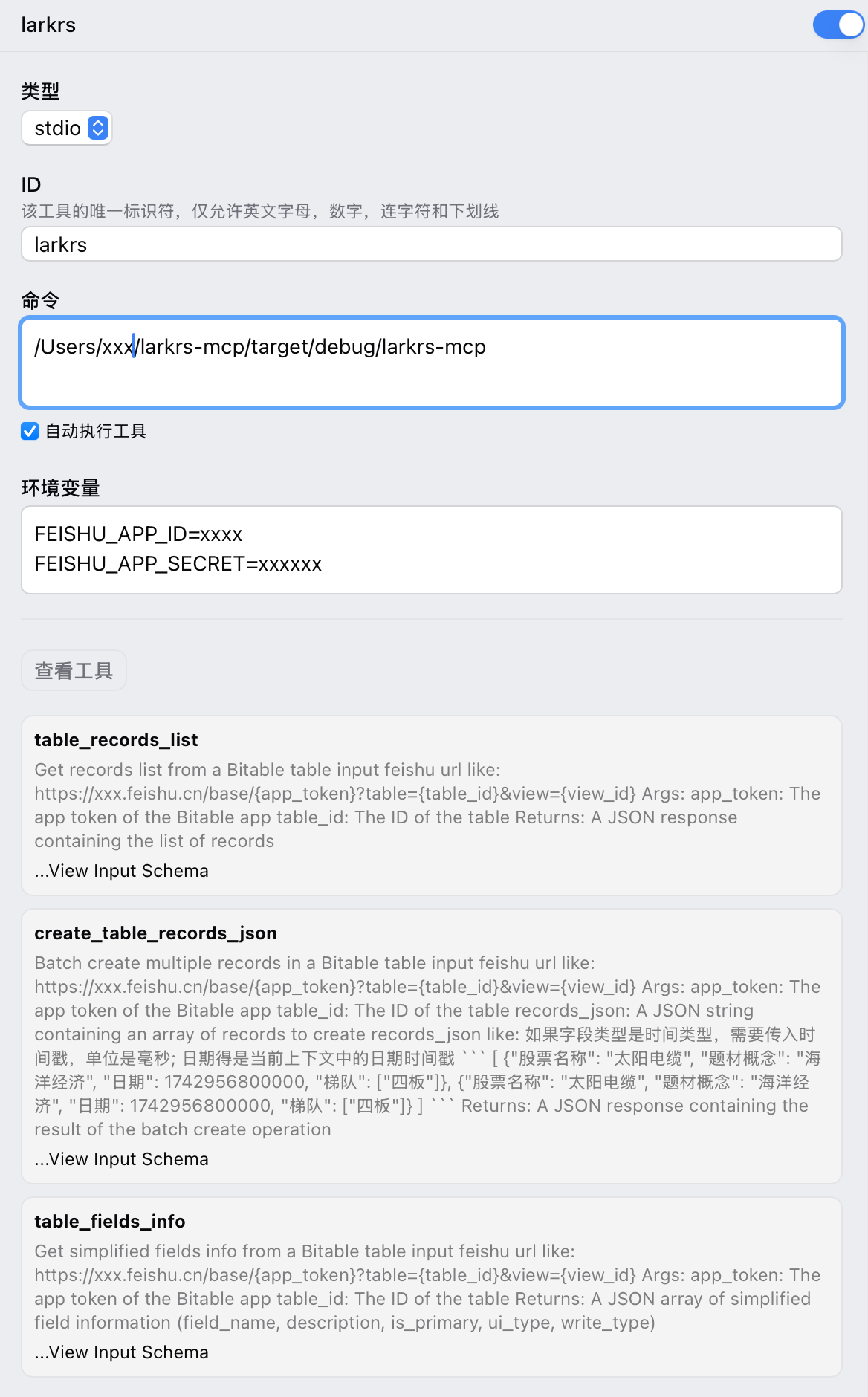
在运行时,按照 .env.example 的格式书写你的环境变量,用于验证飞书身份。
Sign in to leave a review
Use Google, GitHub, or an email account so ratings stay tied to real people.
No reviews posted yet.



