
Gemini Function Calling + Model Context Protocol(MCP) Flight Search
About
Model Context Protocol (MCP) with Gemini 2.5 Pro. Convert conversational queries into flight searches using Gemini's function calling capabilities and MCP's flight search tools
Explore
Natural language flight search using Gemini 2.5 Pro
Automatic parameter extraction via function calling
Integration with mcp-flight-search tool via stdio
Formatted JSON output of flight results
- Environment-based configuration for API keys

Setting up with Highlight
This MCP is not yet compatible with Highlight’s one-click setup. However, you can still use it with Highlight by following these steps:
- Download and install Highlight from highlightai.com/download
- Navigate to the plugins tab and select "Add Custom Plugin"
-
Configure the plugin with the settings below
Plugin Name
Gemini Function Calling + Model Context Protocol(MCP) Flight SearchCommand (node, npx, python, etc.)Please refer to the README for specific instructions on how to obtain API keys or other required environment variables.
- Enable "Start Automatically" if you want the plugin to start when Highlight launches





From the repository
Before running this client, you'll need:
1. Python 3.7+
2. A Google AI Studio API key for Gemini
3. A SerpAPI key (used by the flight search tool)
4. The mcp-flight-search package installed
pip install -r requirements.txt
pip install mcp-flight-search
3. Set Environment Variables:
export GEMINI_API_KEY="YOUR_GEMINI_API_KEY"
export SERP_API_KEY="YOUR_SERPAPI_API_KEY"
```
Replace the placeholder values with your actual API keys:
Get your Gemini API key from Google AI Studio
Get your SerpAPI key from SerpApi
pip install mcp-flight-search
3. Set Environment Variables:
export GEMINI_API_KEY="YOUR_GEMINI_API_KEY"
export SERP_API_KEY="YOUR_SERPAPI_API_KEY"
```
Replace the placeholder values with your actual API keys:
Get your Gemini API key from Google AI Studio
Get your SerpAPI key from SerpApi
Claude Desktop / Cursor
Paste into your MCP client config file to install this server.
{
    "mcpServers": {
        "gemini function calling + model context protocol(mcp) flight search": {
            "mcp-gemini-search": {
                "command": "python",
                "args": [
                    "client.py"
                ]
            }
        }
    }
}McpServers
{
    "mcp-gemini-search": {
        "command": "python",
        "args": [
            "client.py"
        ]
    }
}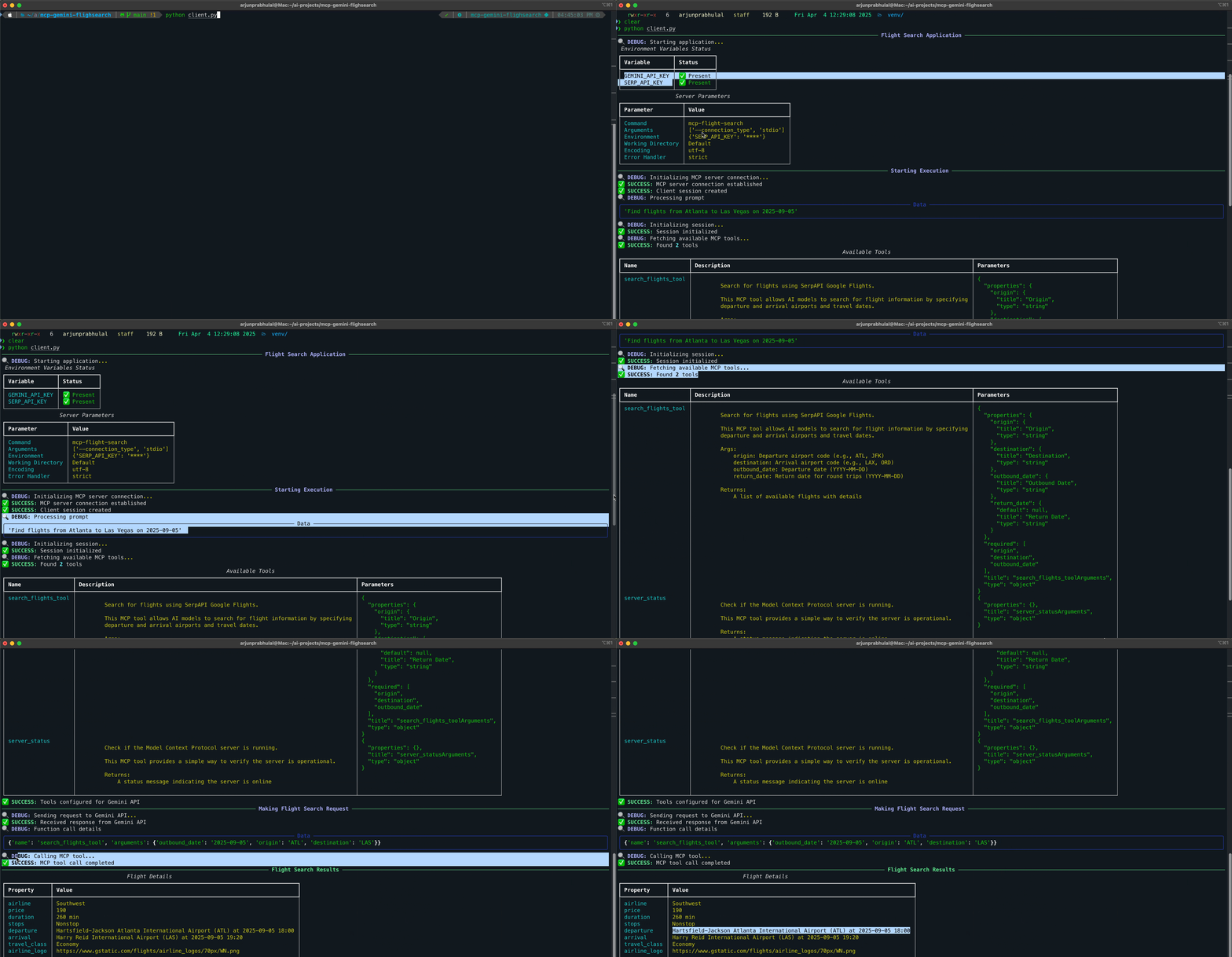
This project demonstrates how to use Google's Gemini 2.5 Pro with function calling capabilities to interact with the mcp-flight-search tool via Model Context Protocol (MCP). This client implementation shows how to:
1. Connect to a local MCP server process (mcp-flight-search) using stdio communication
2. Use natural language prompts with Gemini 2.5 Pro to search for flights (e.g., "Find flights from Atlanta to Las Vegas on 2025-05-05")
3. Let Gemini automatically determine the correct function parameters from the natural language input
4. Execute the flight search using the MCP tool
5. Display formatted results from the search
Features
Natural language flight search using Gemini 2.5 Pro
Automatic parameter extraction via function calling
Integration with mcp-flight-search tool via stdio
Formatted JSON output of flight results
Environment-based configuration for API keys
Prerequisites
Before running this client, you'll need:
1. Python 3.7+
2. A Google AI Studio API key for Gemini
3. A SerpAPI key (used by the flight search tool)
4. The mcp-flight-search package installed
Dependencies
This project relies on several Python packages:
google-generativeai: Google's official Python library for accessing Gemini 2.5 Pro and other Google AI models.
- Provides the client interface for Gemini 2.5 Pro
- Handles function calling capabilities
- Manages API authentication and requests
mcp-sdk-python: Model Context Protocol (MCP) SDK for Python.
- Provides ClientSession for managing MCP communication
- Includes StdioServerParameters for configuring server processes
- Handles tool registration and invocation
mcp-flight-search: A flight search service built with MCP.
- Implements flight search functionality using SerpAPI
- Provides MCP-compliant tools for flight searches
- Handles both stdio and HTTP communication modes
asyncio: Python's built-in library for writing asynchronous code.
- Manages asynchronous operations and coroutines
- Handles concurrent I/O operations
- Required for MCP client-server communication
json: Python's built-in JSON encoder and decoder.
- Parses flight search results
- Formats output for display
- Handles data serialization/deserialization
Setup
1. Clone the Repository:
    git clone https://github.com/arjunprabhulal/mcp-gemini-search.git

    cd mcp-gemini-search
2. Install Dependencies:
    # Install required Python libraries

    pip install -r requirements.txt

    # Install the MCP flight search tool

    pip install mcp-flight-search
3. Set Environment Variables:
    export GEMINI_API_KEY="YOUR_GEMINI_API_KEY"

    export SERP_API_KEY="YOUR_SERPAPI_API_KEY"
Replace the placeholder values with your actual API keys:
Get your Gemini API key from Google AI Studio
Get your SerpAPI key from SerpApi
Architecture
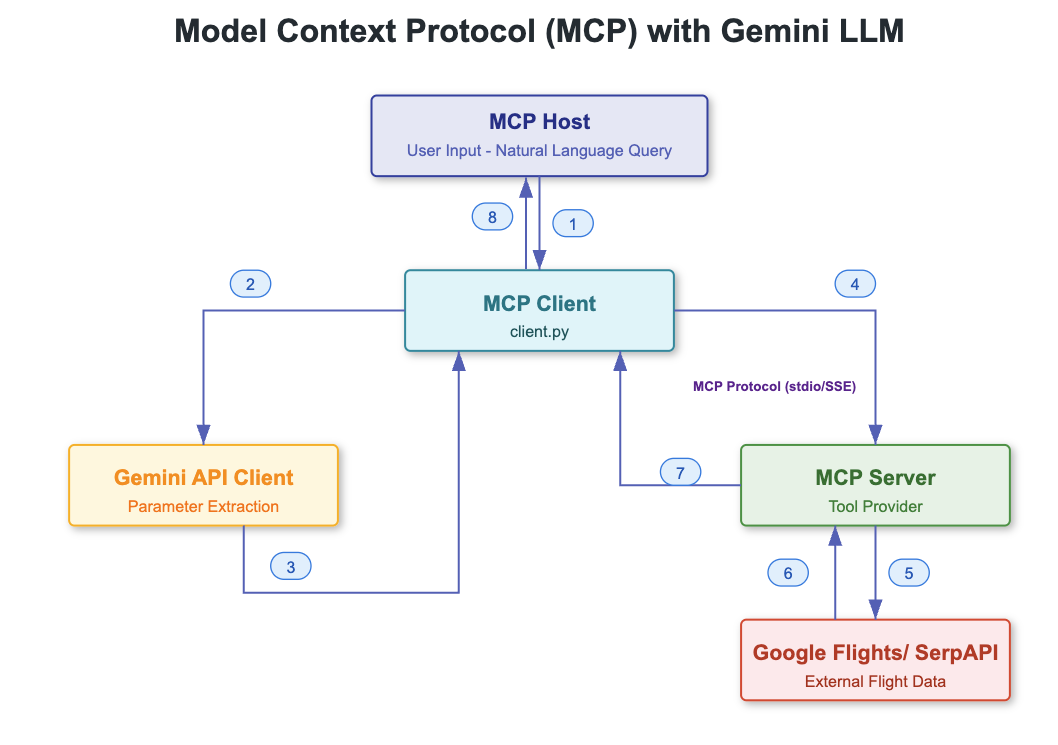
This project integrates multiple components to enable natural language flight search. Here's how the system works:
Component Interactions
1. User to Client
- User provides natural language query (e.g., "Find flights from Atlanta to Las Vegas tomorrow")
- Client script (client.py) processes the input
2. Client to MCP Server
- Client starts the MCP server process (mcp-flight-search)
- Establishes stdio communication channel
- Retrieves available tools and their descriptions
3. Client to Gemini 2.5 Pro
- Sends the user's query
- Provides tool descriptions for function calling
- Receives structured function call with extracted parameters
4. Client to MCP Tool
- Takes function call parameters from Gemini
- Calls appropriate MCP tool with parameters
- Handles response processing
5. MCP Server to SerpAPI
- MCP server makes requests to SerpAPI
- Queries Google Flights data
- Processes and formats flight information
Data Flow
1. Input Processing
User Query → Natural Language Text → Gemini 2.5 Pro → Structured Parameters
2. Flight Search
Parameters → MCP Tool → SerpAPI → Flight Data → JSON Response
3. Result Handling
JSON Response → Parse → Format → Display to User
Communication Protocols
1. Client ↔ MCP Server
- Uses stdio communication
- Follows MCP protocol for tool registration and calls
- Handles asynchronous operations
2. MCP Server ↔ SerpAPI
- HTTPS requests
- JSON data exchange
- API key authentication
3. Client ↔ Gemini 2.5 Pro
- HTTPS requests
- Function calling protocol
- API key authentication
Error Handling
The integration includes error handling at multiple levels:
- Input validation
- API communication errors
- Tool execution failures
- Response parsing issues
- Data formatting problems
Usage
Run the client:
python client.py
The script will:
1. Start the MCP flight search server process
2. Send your flight search query to 2.5 Pro
3. Use Gemini's function calling to extract search parameters
4. Execute the search via the MCP tool
5. Display the formatted results
Related Projects
This client uses the mcp-flight-search tool, which is available at:
GitHub: arjunprabhulal/mcp-flight-search
PyPI: mcp-flight-search
Author
For more articles on AI/ML and Generative AI, follow me on Medium: @arjun-prabhulal
License
This project is licensed under the MIT License.
Sign in to leave a review
Use Google, GitHub, or an email account so ratings stay tied to real people.
No reviews posted yet.



