🔗 MCP Link — Let AI Agents Use Your Tools
About
Let AI agents like ChatGPT & Claude use real-world local/remote tools you approve via browser extension + optional MCP server
Explore
- Works with ChatGPT, Claude, Gemini, Perplexity, Grok, and others
- User-controlled tool permissions with three approval policies per tool
- Supports both remote tools (no setup) and local tools (optional server)
- Docker sandboxing for isolated and secure tool execution
- Transparent logging of every tool request and response
- Recipe system that activates tool discovery on supported AI websites
1. Install the MCP Link browser extension
Chrome and Edge Web Store links coming soon
Manual installation (until the store listing is live):
a. Clone this repository, or download the ZIP and extract it somewhere on your PC or Mac.
b. In Chrome: open the (top-right) ... menu (⋮) → Extensions → Manage Extensions.
1. Enable Developer mode
2. Click Load unpacked.
3. Browse to the location from step (a) and open the folder named extension inside mcp-link.
4. Click Select folder.
c. Pin the icon: click the puzzle piece icon, then click the pin next to MCP Link.
d. Click the MCP Link icon (or right‑click any page and choose Ask AI), accept the EULA, then add your favourite MCP server(s) (SSE only).
2. Visit a supported AI site such as https://chatgpt.com, https://claude.ai, etc.
3. Let the AI suggest tools. The extension handles the rest (no configuration required unless you want local tools).
> 🛠️ After installation the extension can guide you through setting up the optional MCP server for advanced local tool use.
---
These tools are served from secure cloud providers and work out-of-the-box — no local server required. You can use any providers you like. All remote tools use HTTPS, CORS-safe, and privacy-compliant endpoints. The following from provider https://mcp.aurafriday.com/sse are available from first install:
| 🌐 Tool ID | ⚡ Description | 🔓 Access |
| ------------------- | ---------------------------------------------- | --------- |
| geolocation | Reveals your location using browser GPS or IP | ✅ Free |
| weather | Fetches local weather info using your location | ✅ Free |
| adaptive_thinking | Helps agents reflect, revise, and plan actions | ✅ Free |
> "Calling geolocation tool now using MCP Link... (you can inspect the request and response below)"
> ▶ Show tool input/output
---
geolocation
Reveals your location using browser GPS or IP
weather
Fetches local weather info using your location
adaptive_thinking
Helps agents reflect, revise, and plan actions
cards
Draws random cards for agent decision-making
sqlite
Runs semantic and raw SQL queries on your data
tts
Speaks text using your system's speakers
stt
Transcribes audio from your microphone
whatsapp
Sends messages via your personal WhatsApp
openrouter
Proxies multiple AI models via user API keys
ai_chat
Enables agent-to-agent chat coordination
docker
**Isolates tools and actions in a secure container sandbox**
MCP Link is a complete framework that enables AI agents to interact with the real world through a controlled, curated, safe and verified browser- and server-based toolchain.
This project enables:
🧠 ChatGPT, Claude, Gemini, Perplexity, Grok, and others to discover and use tools via an extension in your browser
🔧 A flexible Model Context Protocol (MCP) server that safely executes local or remote tools
🧩 A fully modular recipe + plugin system that supports AI integration, monetization, and control
mcp-link by Aura Friday is a unified ecosystem designed to securely connect your digital life; comprising a browser extension, server, mobile apps, and IoT components.
---
MCP Link enables AI agents to call both remote tools (hosted online) and local tools (run securely on your own machine or LAN).
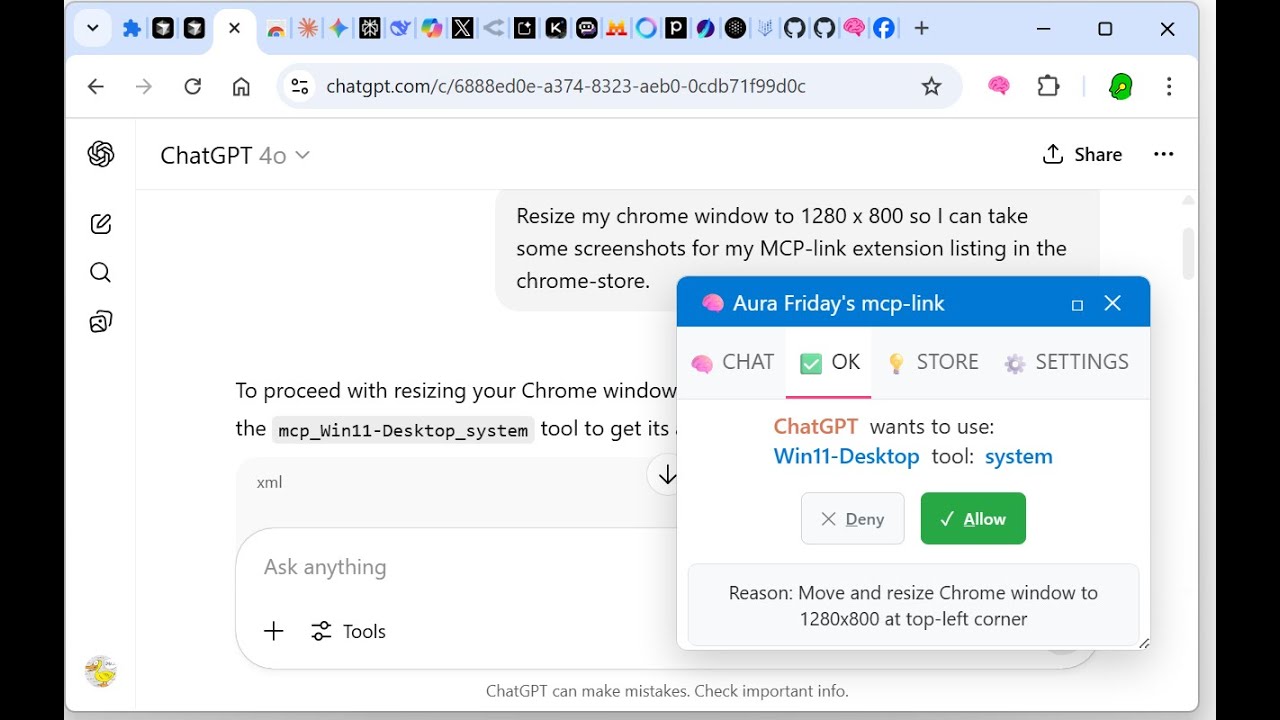
Tools are activated using structured markup emitted by supported AI models and interpreted by the extension — but only for tools the user has explicitly enabled.
---
MCP Link gives complete tool-level control to the user.
Every tool goes through a two-step permissions process:
| Control Layer | Description |
| ------------------------- | ----------------------------------------------------------------------------------------------------------------------------------------------------------------------------------------------------------------------------------------------------------------------------------------------------------------------- |
| 🧩 Tool Visibility | Users can enable or disable each tool via checkboxes in the extension UI. Only enabled tools are advertised to AI agents. Disabled tools are entirely invisible. |
| ✅ Tool Usage Approval | For enabled tools, the user can choose one of three runtime access policies:<br> - Ask every time — show a popup before the tool is used<br> - Allow automatically — skip popup for trusted tools<br> - Always allow ("YOLO Mode") — useful for sandboxed tools running in Docker or read-only environments |
These settings are stored per tool and per user, and can be changed at any time from the MCP Link extension popup.
---
🔄 Tool definitions, icons, security settings, and descriptions are dynamically fetched from:
https://cdn.aurafriday.com/config.json
This remote manifest allows new tools to be offered without requiring an extension update. The extension only shows tools the user has opted into and can never activate tools without user permission.
---
🔐 This permission architecture ensures:
The AI can never use tools you didn’t approve
Even for approved tools, you can choose to review each use
If you trust a tool (e.g. running inside Docker), you can allow hands-free execution
---
> ✅ This browser extension works immediately with remote tools — no setup required.
> 🛠️ Users can later install local tools for richer offline or private workflows.
---
These tools are served from secure cloud providers and work out-of-the-box — no local server required. You can use any providers you like. All remote tools use HTTPS, CORS-safe, and privacy-compliant endpoints. The following from provider https://mcp.aurafriday.com/sse are available from first install:
| 🌐 Tool ID | ⚡ Description | 🔓 Access |
| ------------------- | ---------------------------------------------- | --------- |
| geolocation | Reveals your location using browser GPS or IP | ✅ Free |
| weather | Fetches local weather info using your location | ✅ Free |
| adaptive_thinking | Helps agents reflect, revise, and plan actions | ✅ Free |
> "Calling geolocation tool now using MCP Link... (you can inspect the request and response below)"
> ▶ Show tool input/output
---
If the user installs any local MCP Server, like the optional one included in this repo, additional tools become available for deeper integration:
| 🛠️ Tool ID | ⚡ Description | 🔓 Access |
| ------------ | ------------------------------------------------------------ | ------------ |
| cards | Draws random cards for agent decision-making | ✅ Free |
| sqlite | Runs semantic and raw SQL queries on your data | ✅ Free |
| tts | Speaks text using your system's speakers | ✅ Free |
| stt | Transcribes audio from your microphone | ✅ Free |
| whatsapp | Sends messages via your personal WhatsApp | 🔐 Licensed |
| openrouter | Proxies multiple AI models via user API keys | ✅ Configured |
| ai_chat | Enables agent-to-agent chat coordination | 🔐 Licensed |
| docker | Isolates tools and actions in a secure container sandbox | ✅ Critical |
> 🔐 Docker integration is a key differentiator. MCP Link can route tool calls into a containerized environment, reducing risk of file access, escalation, or unintended actions by AIs. This enables safe, real-world agentic control — even over powerful tools.
More tools added weekly. Some are free. Some may contain payment or subscription flows.
---
Whenever a tool is used, MCP Link displays a dropdown summary in your browser showing:
✅ The tool name
📤 The exact request sent
📥 The raw response returned
🕒 A timestamp for audit/logging
This ensures users stay fully informed — and AIs can explain their actions clearly.
> "Here’s what I sent and received:"
---
MCP Link is a complete framework that enables AI agents to interact with the real world through a controlled, curated, safe and verified browser- and server-based toolchain.
This project enables:
🧠 ChatGPT, Claude, Gemini, Perplexity, Grok, and others to discover and use tools via an extension in your browser
🔧 A flexible Model Context Protocol (MCP) server that safely executes local or remote tools
🧩 A fully modular recipe + plugin system that supports AI integration, monetization, and control
mcp-link by Aura Friday is a unified ecosystem designed to securely connect your digital life; comprising a browser extension, server, mobile apps, and IoT components.
---
🧭 A Note on Our Source Code Philosophy
This project is engineered by a high-security software development professional with over 4 decades of experience in quality, stability, and long-term product survivability. To protect the integrity of the ecosystem for all users, we operate under a "visible source" model.
✅ Source is Visible: You are encouraged to read our code to inspect its quality, audit its security, and understand its mechanics.
❌ Source is Proprietary: You cannot fork, copy, or reuse this code. This prevents harmful fragmentation and ensures every user benefits from a single, SECURE, expertly-maintained source of truth.
🤝 Collaboration is Welcome: We invite all ideas, bug reports, and feature requests through this repository's Issues and Discussions. Let's build the future of this tool together, in one place.
---
⚖️ Legal Notices
This repository is subject to a strict proprietary license.
For Source Code: All source code is governed by the terms in the LICENSE file.
For Software Use: Your use of the compiled applications is governed by the End-User License Agreement (EULA.md).
---
Sign in to leave a review
Use Google, GitHub, or an email account so ratings stay tied to real people.
No reviews posted yet.