
MCP WhatsApp Server
About
# MCP WhatsApp Server Servidor baseado no [Model Context Protocol (MCP)](https://modelcontextprotocol.io/) para integração com WhatsApp através da API Waha. ## Sobre o Projeto Este servidor permite que assistentes IA compatíveis com MCP (como Claude) interajam diretamente com contatos no WhatsApp. O projeto utiliza a…
Explore
- Check WhatsApp connection status
- Send messages by phone number
- Send messages by saved contact name
- Manage contacts by name in a JSON file
- View server configuration and contact list

Setting up with Highlight
This MCP is not yet compatible with Highlight’s one-click setup. However, you can still use it with Highlight by following these steps:
- Download and install Highlight from highlightai.com/download
- Navigate to the plugins tab and select "Add Custom Plugin"
-
Configure the plugin with the settings below
Plugin Name
MCP WhatsApp ServerCommand (node, npx, python, etc.)Please refer to the README for specific instructions on how to obtain API keys or other required environment variables.
- Enable "Start Automatically" if you want the plugin to start when Highlight launches





From the repository
Install dependencies with pip install -r requirements.txt, set environment variables (WAHA_API_URL, WAHA_SESSION_ID, optional CONTATOS_FILE) in a .env file, configure contacts in a contatos.json file, start the Waha API, then run python server.py. Connect any MCP-compatible client to the server.
- verificar_conexao_whatsapp() - Verifica o status atual da conexão
- enviar_mensagem_whatsapp(numero, mensagem) - Envia mensagem por número
Claude Desktop / Cursor
Paste into your MCP client config file to install this server.
{
    "mcpServers": {
        "mcp whatsapp server": {
            "mcp-whatsapp-server": {
                "command": "python",
                "args": [
                    "server.py"
                ]
            }
        }
    }
}McpServers
{
    "mcp-whatsapp-server": {
        "command": "python",
        "args": [
            "server.py"
        ]
    }
}
Servidor baseado no Model Context Protocol (MCP) para integração com WhatsApp através da API Waha.
Sobre o Projeto
Este servidor permite que assistentes IA compatíveis com MCP (como Claude) interajam diretamente com contatos no WhatsApp. O projeto utiliza a Waha API como backend para comunicação com o WhatsApp Web.
Funcionalidades
- ✅ Verificação do status de conexão do WhatsApp
- ✅ Envio de mensagens via número de telefone
- ✅ Envio de mensagens via nome de contato cadastrado
- ✅ Gerenciamento de contatos por nome
- ✅ Visualização de configurações do servidor
Requisitos
- Python 3.7+
- API Waha em execução
- Biblioteca MCP (Fast MCP)
Instalação
1. Clone este repositório:
   git clone https://github.com/seu-usuario/mcp-whatsapp-server.git

   cd mcp-whatsapp-server
2. Instale as dependências:
pip install -r requirements.txt
3. Configure as variáveis de ambiente em um arquivo .env:
   WAHA_API_URL=http://localhost:3000

   WAHA_SESSION_ID=default

   CONTATOS_FILE=caminho/para/contatos.json (opcional)
4. Configure seus contatos no arquivo contatos.json:
   {

       "contatos": {

           "Nome1": "5511999999999",

           "Nome2": "5522888888888"

       }

   }
Uso
1. Inicie a API Waha seguindo as instruções oficiais
2. Execute o servidor MCP:
python server.py
3. Use o servidor com um cliente MCP compatível (como Claude Desktop)
Recursos MCP Disponíveis
Resources
- waha://configuracao - Configurações da API Waha
- waha://status - Status atual da conexão WhatsApp
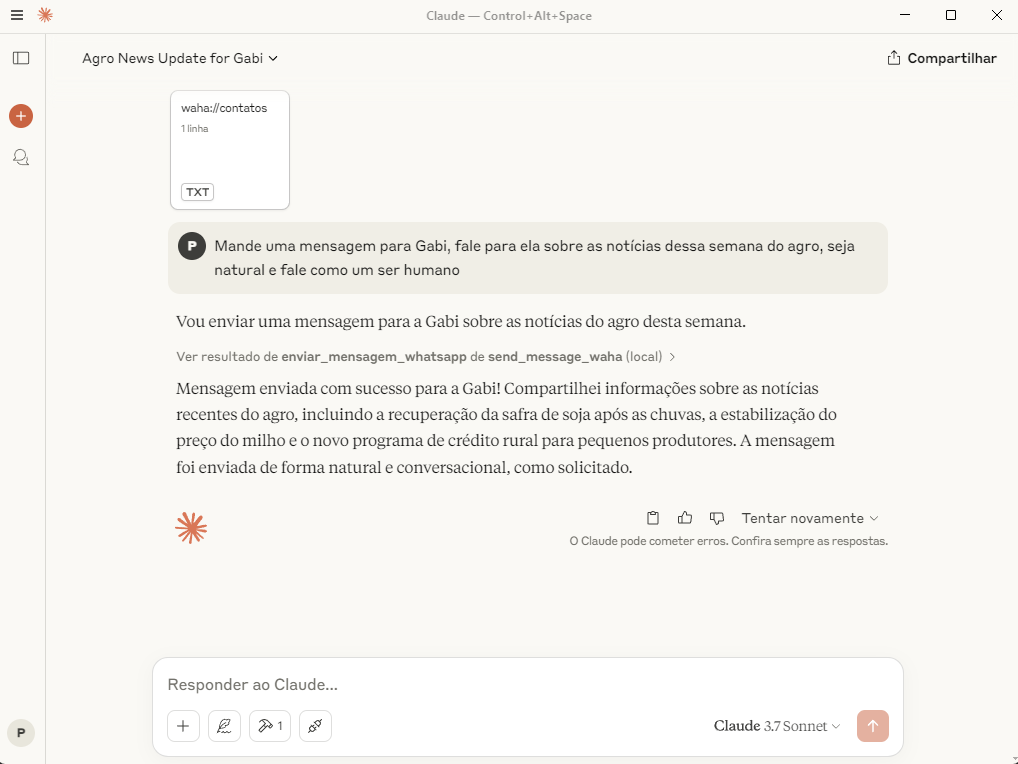
- waha://contatos - Lista de contatos mapeados por nome
Ferramentas (Tools)
- verificar_conexao_whatsapp() - Verifica o status atual da conexão
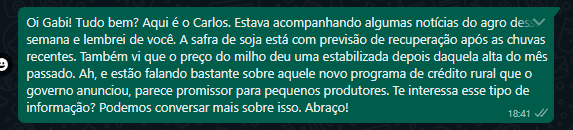
- enviar_mensagem_whatsapp(numero, mensagem) - Envia mensagem por número
Exemplos
Verificar Status da Conexão
status = verificar_conexao_whatsapp()
print(f"Status: {status['mensagem']}")
Enviar Mensagem por Número
resultado = enviar_mensagem_whatsapp("5511999999999", "Olá! Esta é uma mensagem de teste.")
print(f"Resultado: {resultado['mensagem']}")
Enviar Mensagem por Nome
resultado = enviar_mensagem_por_nome("Pedro", "Olá! Esta é uma mensagem de teste.")
print(f"Resultado: {resultado['mensagem']}")
Contribuições
Contribuições são bem-vindas! Sinta-se à vontade para abrir issues ou enviar pull requests.
Licença
Este projeto está licenciado sob MIT License.
Imagens e Demonstração
Exemplos de uso
Sign in to leave a review
Use Google, GitHub, or an email account so ratings stay tied to real people.
No reviews posted yet.



