
Memex - Giving Claude a memory
About
One searchable memory of your Claude.ai chats and Claude Code sessions, served over MCP. Local-first MCP server that indexes your full Claude.ai history and your Claude Code / terminal sessions, then exposes them to Claude Code (stdio) and to Claude.ai (remote connector). Hybrid
Explore
- Hybrid search (vector + FTS5 BM25) across all indexed chats.
- Live capture via Chrome extension for new claude.ai chats.
- Local-first: data stored in SQLite + sqlite-vec, no cloud dependency.
- Embeddings via fastembed (zero-config) or optional local Ollama.
- Auto-summaries and chat ↔ repo association.
- One-command cross-platform setup (macOS, Linux, Windows).
- Remote MCP connector for claude.ai with GitHub OAuth and IP‑level tunnel.

Setting up with Highlight
This MCP is not yet compatible with Highlight’s one-click setup. However, you can still use it with Highlight by following these steps:
- Download and install Highlight from highlightai.com/download
- Navigate to the plugins tab and select "Add Custom Plugin"
-
Configure the plugin with the settings below
Plugin Name
Memex - Giving Claude a memoryCommand (node, npx, python, etc.)Please refer to the README for specific instructions on how to obtain API keys or other required environment variables.
- Enable "Start Automatically" if you want the plugin to start when Highlight launches





From the repository
Install
One command installs uv + Memex and runs memex setup (registers the MCP server, installs the always-on capture service, indexes your local sessions, prints the pairing token):
```bash
- search_chats(query, limit=5, source?, mode="hybrid", repo?) searches the corpus. Modes: hybrid (default, combines vector search + FTS5 BM25 via Reciprocal Rank Fusion), semantic (vectors only), lexical (FTS5 only, ideal for proper nouns or exact terms). source filters by origin (conversations, design_chat, memory). repo boosts results associated to a registered repo (see "Repo associations" below). Deduplicated per conversation.
- get_chat(uuid, messages_limit=10, messages_offset=0) fetches a conversation with its messages, paginated. raw_content is omitted; each message is truncated to 1500 chars to stay inside the client's token budget (worst-case response ~17k chars). Long chats are paginated with messages_offset; max messages_limit is 100.
- list_recent_chats(limit=10, source?) lists the latest chats ordered by last update.
- find_related(context, limit=5, repo?) takes free-form text (a paragraph, a file contents, the current discussion) and returns chats that are semantically related. Pure vector search, no FTS, capped at 4000 input chars. Useful when you want "more like this" without typing a keyword query.
Search is also reachable from the CLI with memex search "query" --mode {hybrid|semantic|lexical}. For databases created before the hybrid FTS5 work, run memex reindex-fts once to populate the lexical index.
Claude Desktop / Cursor
Paste into your MCP client config file to install this server.
{
    "mcpServers": {
        "memex - giving claude a memory": {
            "memex": {
                "command": "uvx",
                "args": [
                    "--from",
                    "memex-chats",
                    "memex-mcp"
                ]
            }
        }
    }
}McpServers
{
    "memex": {
        "command": "uvx",
        "args": [
            "--from",
            "memex-chats",
            "memex-mcp"
        ]
    }
}


Your Claude.ai chats and your Claude Code sessions live in two worlds that never talk. Memex makes them one memory you can search from both.
Local-first MCP server that indexes your Claude.ai chat history and your local Claude Code / terminal sessions, and exposes them to Claude Code (stdio) and Claude.ai (remote MCP connector).
Status: alpha, 0.3.1 on PyPI. Phases 0 to 7 closed, security-audited (plus four adversarial red-team rounds). Shipped: hybrid search, live capture, auto-summaries, chat ↔ repo association, the Claude.ai remote connector (GitHub OAuth), Claude Code / terminal ingestion with secret redaction, one-command setup, cross-platform autostart, and one-click claude.ai history backfill.
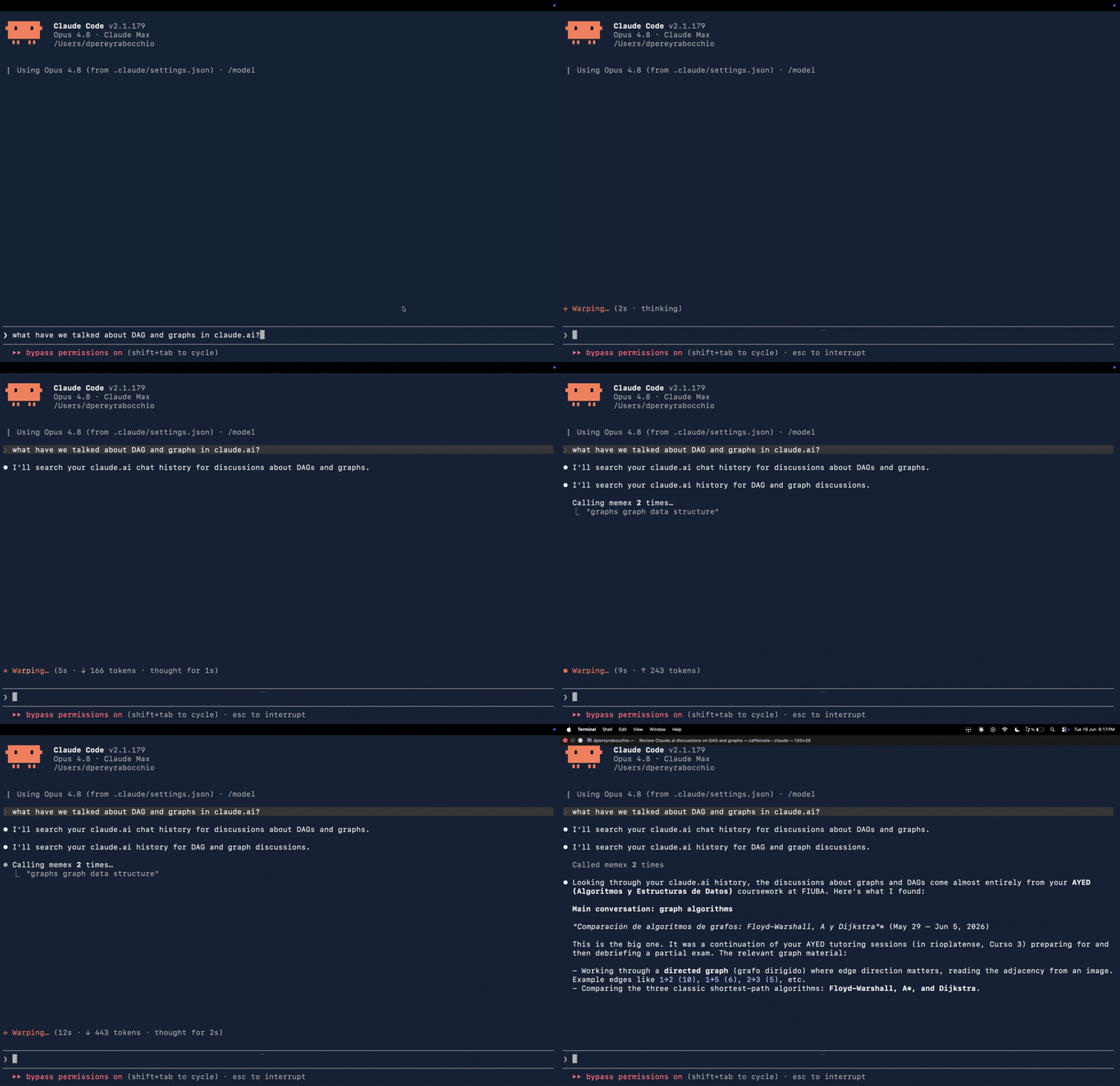
End-to-end demo: from Claude Code, you ask about something you discussed on claude.ai. Memex searches your chat history (search_chats) and Claude answers from the real conversation. No copy-paste, no manual context handoff.
Install
One command installs uv + Memex and runs memex setup (registers the MCP server, installs the always-on capture service, indexes your local sessions, prints the pairing token):
```bash
Sign in to leave a review
Use Google, GitHub, or an email account so ratings stay tied to real people.
No reviews posted yet.



